
If you are about to plan yet another storewide BFCM deal, let’s stop for a moment. BFCM is a truly remarkable opportunity to grow your business, and putting a little extra thought into the offers you run can really make the difference.
The six Black Friday promotion ideas below take into account both how to earn more on the peak days themselves and how to turn the customers you win on Black Friday into loyal ones.
1. Give a gift instead of a discount
Why it works. A gift raises the order value without eating into your margin. If you set the threshold just above your average order value, the gift gives customers the extra nudge they need to buy more: with an average order of $50, a free gift from $65 is a good reason to add one more item to the cart.
The beauty of this idea is also that a gift often costs you less than it is worth to the customer. A product that sells for $20 might cost you $6 to make or buy, while a 15% discount on the same $65 order would cost you $9.75. And if the gift is a small size of a product the customer has not tried yet, it also prepares the next order.
Who does it. Charlotte Tilbury, the well-known beauty brand, runs gift-with-purchase offers regularly, and some of them are live right now. One of its 2025 offers had three tiers:
- spend over $110 and get a lip blur;
- spend over $170 and also get an eyeshadow palette;
- spend over $220 and get both, plus a cleanser.
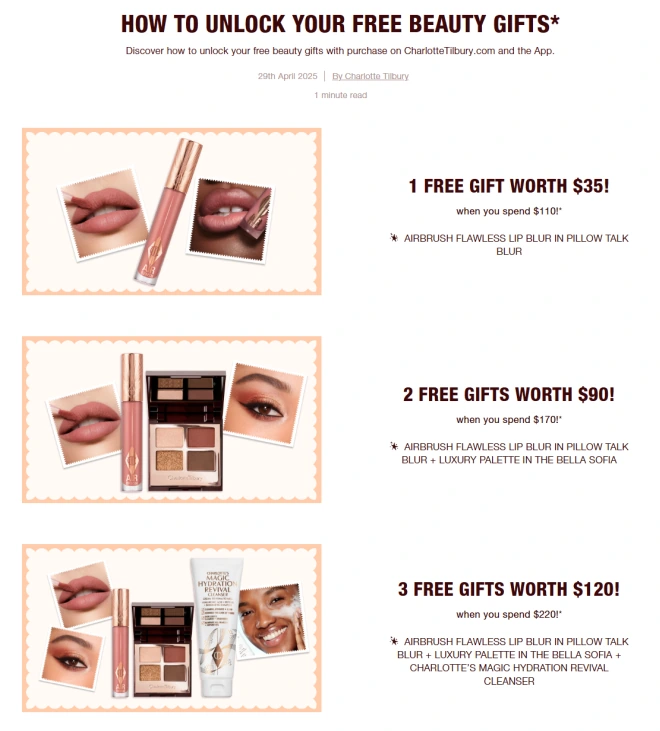
Every tier adds one more gift, so a customer who is close to the next threshold always has a reason to add another product.
Setting it up in Shopify.
- Go to Discounts, create a discount and choose Buy X get Y.
- Under “Customer buys”, choose Minimum purchase amount, enter the threshold, for example $65, and pick the products or collections that count toward it.
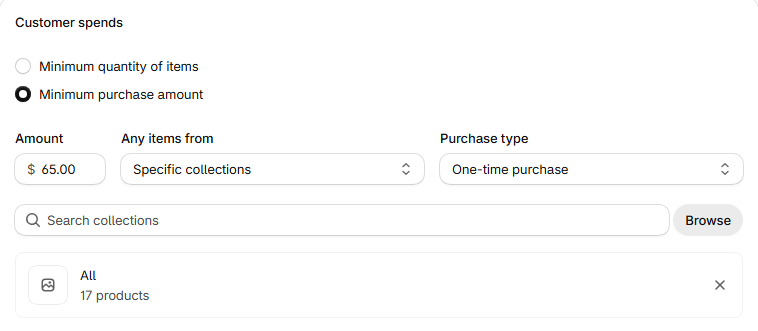
- Under “Customer gets”, choose the gift product and set the discount to Free.
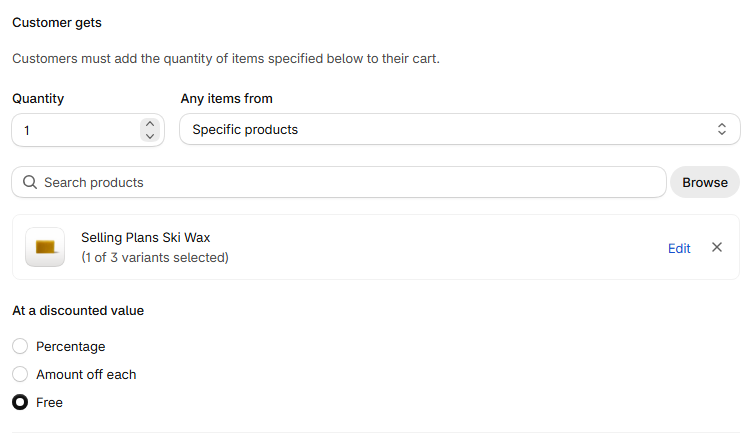
- Set the maximum number of uses per order to 1, and set the active dates for your offer.
Shopify, however, never adds the gift to the cart automatically. The customer has to add it, so tell people about the gift across your website, in the cart and in your emails.
Setting it up with an app. Free gift apps can add the gift to the cart automatically as soon as the cart reaches the threshold, which removes the unnecessary step from the customer journey. So if you want to make this shopping experience truly flawless, look for a suitable Buy X Get Y app in the Shopify App Store.
2. Run a different offer on each day
Why it works. One sitewide discount for four days gives customers one reason to visit, while a new offer every day gives them a reason to open your email each morning.
Daily offers can also be narrower than a sitewide sale, which lets you pick wisely, discounting only the products where a discount makes business sense. A 25% discount on one collection for one day costs much less of your margin than 25% on the whole store for four days.
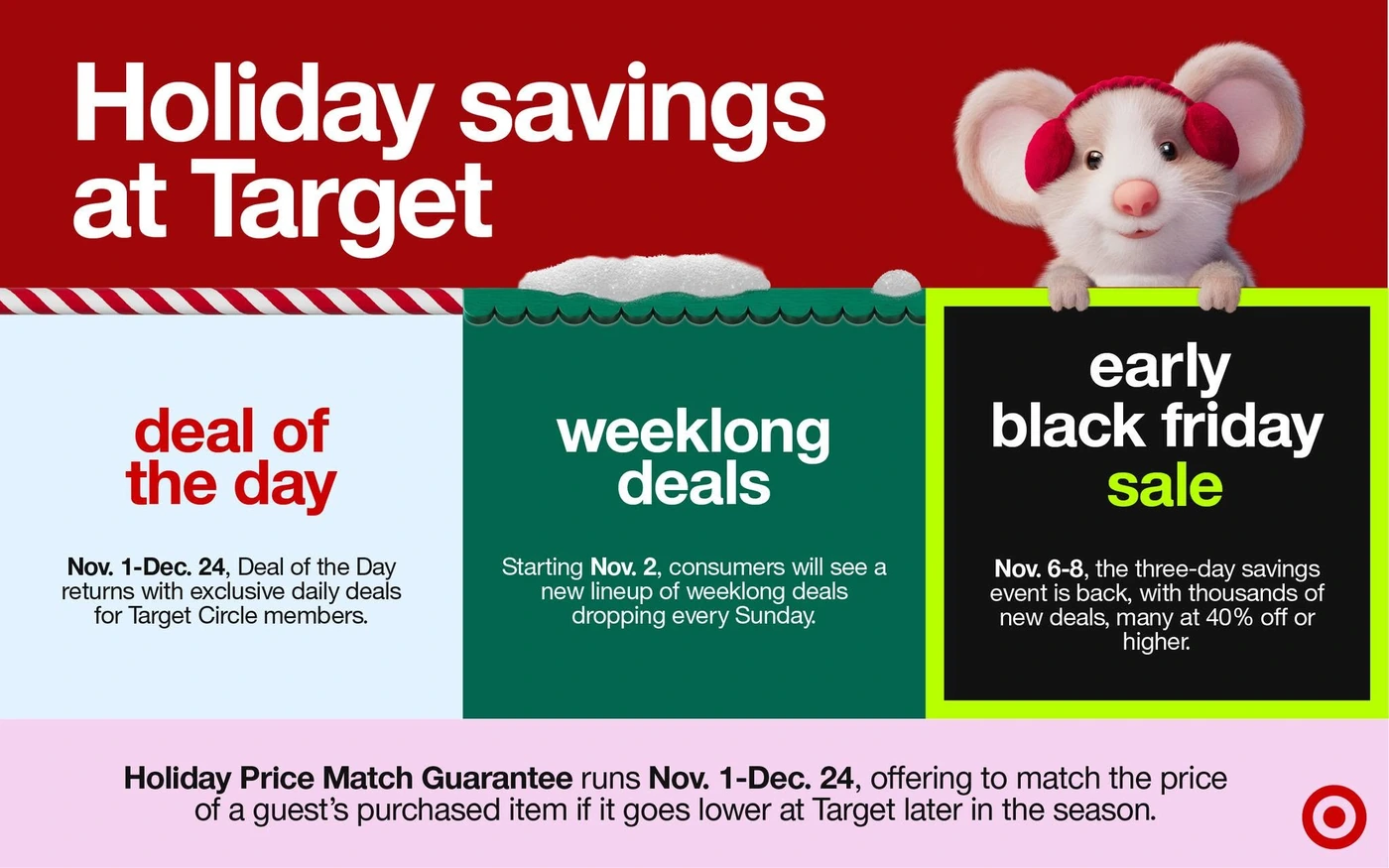
Who does it. Target ran a deal of the day through the whole 2025 holiday season: “Special deals dropping daily Nov. 1 through Dec. 24”. On top of that, a new set of weekly deals started every Sunday, and an Early Black Friday Sale ran from November 6 to 8.
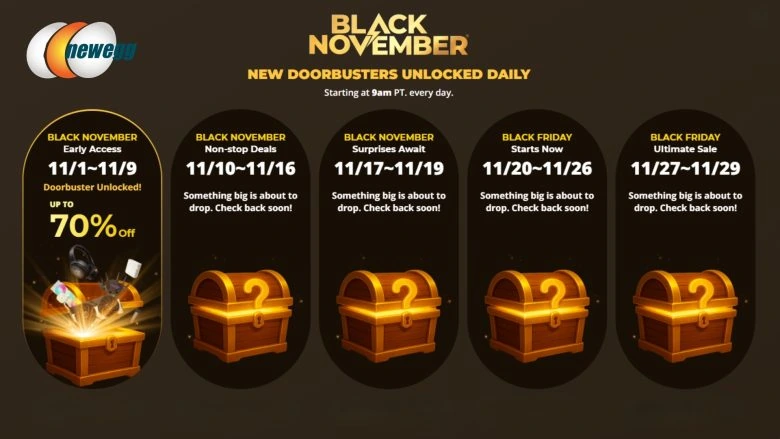
Newegg, the online electronics retailer, built its whole Black November 2025 around the same idea. New doorbuster deals unlocked every day at 9:00 a.m. PT from November 1 to November 29, and the month was split into five stages, from “Early Access” to “Black Friday Ultimate Sale”.
Setting it up in Shopify. Your first option is to create one automatic discount for each daily offer and set its start and end time in the Active dates section. The drawback of this setup is that customers do not see the deal on the storefront: Shopify’s automatic discounts appear in the cart and at checkout, but not on product pages.
To show the sale across the store, you need to set up compare-at prices, and those are much less convenient. Shopify has no setting to schedule them, so you have to change the prices manually at midnight and change them back the next day. We walk through that manual route in our guide to running a flash sale on Shopify.
Setting it up with an app. To automate sale prices, look in the App Store for apps that schedule sale prices or run flash sales.
3. Open the sale early for subscribers
Why it works. Early access gives people a reason to hurry, especially when your offer makes it clear that the time and the stock are limited. It also works as a hook for building your email list: a sign-up form that promises early access starts bringing in subscribers months before BFCM. Plus, early access spreads the orders over more days, so your stock and your support team are not tested all at once.
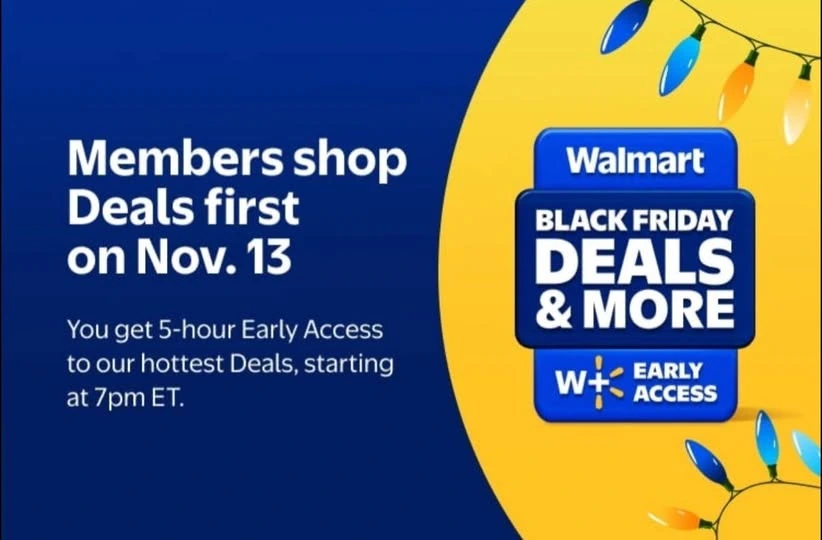
Who does it. Big retailers and fashion brands both use it. In 2025, Walmart+ members got five hours of early access online before each of Walmart’s three Black Friday deal events.
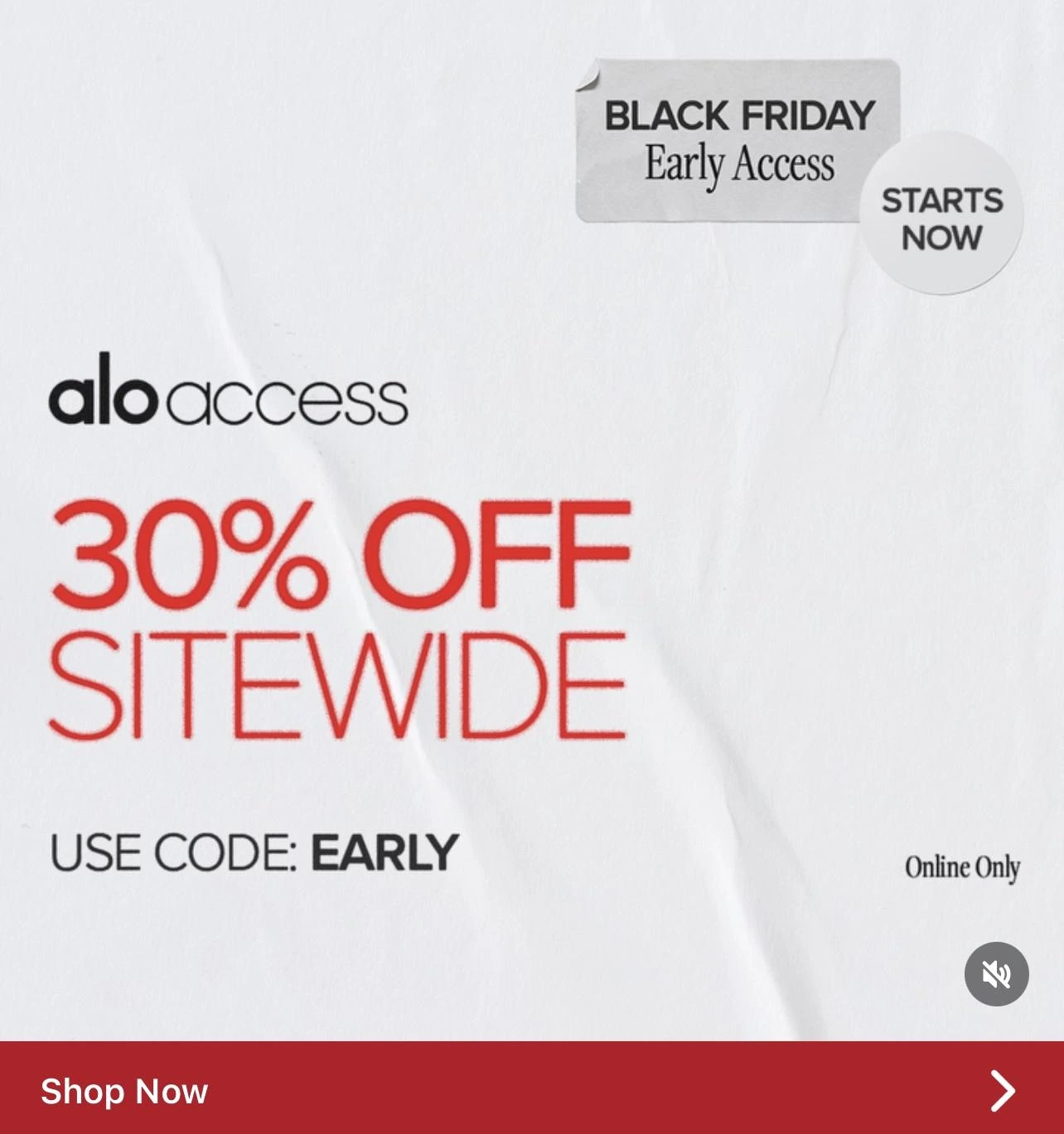
Alo Yoga has run the same play for years. In late October 2025, it opened a Black Friday early access sale with 30% off sitewide for members of Alo Access, its free loyalty program.
Setting it up in Shopify.
- In your Shopify admin, go to the Customers section and create a segment with the filter
email_subscription_status = 'SUBSCRIBED'. - Create a discount code. Under customer eligibility, choose that segment.
- Set the active dates to start a day before the public sale.
- Send the code to the segment, for example with Shopify Email.
Shopify has to recognise the customer to apply a segment discount, so ask subscribers to sign in or to check out with the email address they subscribed with.
Setting it up with an app. When early access runs next to other deals, you need control over how the discounts meet. Say, your early access offer is a discount on the whole order, and some products already have clearance prices. By default, the early access discount lands on top of the discounted price, and the affected products might sell for less than you planned.
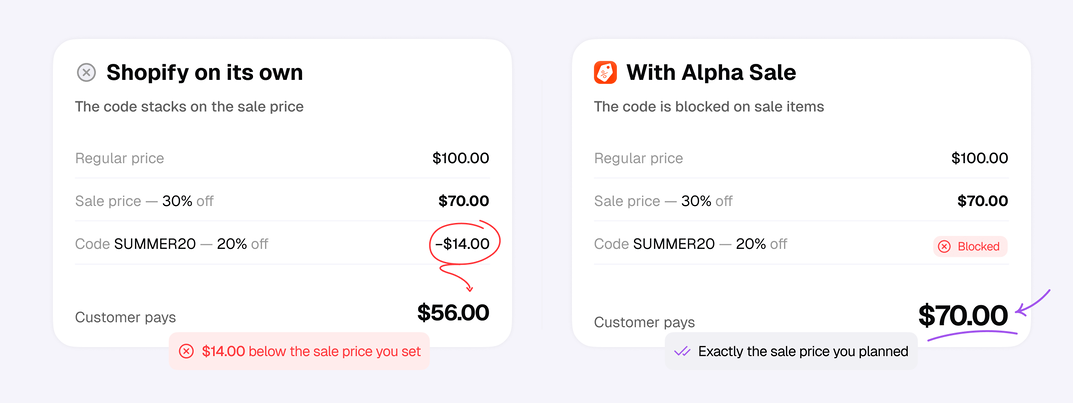
In Shopify alone, you can limit a code to a collection of full-price products, and we show how in our guide to stopping discount codes on sale items. Apps like Alpha Sale let you exclude products that are already on sale from coupons you create, or block using coupons on a list of protected products.
4. Give extra loyalty points instead of a deeper discount
Why it works. Points are not a discount here and now. They are a way to bring customers back for another purchase after the season and raise their LTV. This means you don’t lose your margin on one-time orders, but pay for the points only when the customer comes back for a second time.
Points can also feel worth more than a discount of the same size. Earning 100 points on an order may feel better than getting $2 off, even if those 100 points later turn into exactly $2.
Who does it. LEGO used points instead of a deeper discount around Black Friday 2025. During the main sale, LEGO Insiders members earned 4x Insiders Points on select sets from November 28 to December 2. A week earlier, on November 22 and 23, an Insiders Weekend gave members double points.
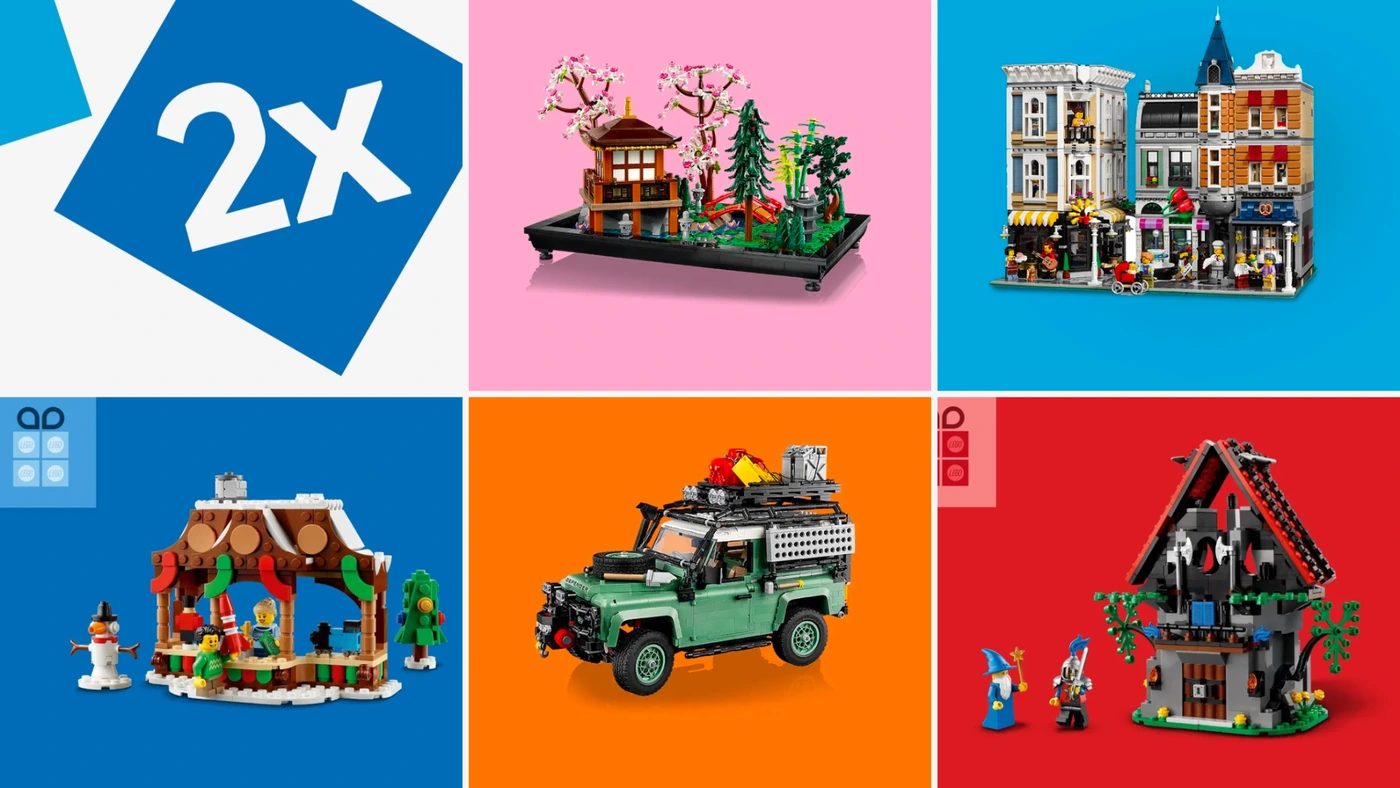
Two details are worth copying. The 4x points applied only to selected sets, not to the whole store, so LEGO decided where to spend the extra reward. And the double points came a week before Black Friday, so members already had a balance to spend during the sale itself.
Setting it up in Shopify. Shopify has no built-in loyalty program, so you need an app for it.
Setting it up with an app. In the Shopify App Store, look for a loyalty app that can raise the points for a set period or for selected products.
5. Let new customers reach a VIP tier over the weekend
Why it works. Ongoing VIP rewards give customers a reason to choose your store for the rest of the year, not just for one weekend. So if you run a VIP tier program, another way to lift holiday sales and win repeat customers is to let first-time customers move to a higher loyalty tier right away.
Set the first tier a little above one typical order. If customers usually spend $50, a tier from $65 is within reach on Black Friday, and some customers will add an item to reach it. The perks of the tier, such as free shipping, a discount or a small branded gift, cost you something only when the customer orders again.
Who does it. True Religion relaunched its loyalty program, True Rewards, right before Black Friday 2024. The tiers in True Rewards are based on yearly spend: a customer becomes a Trendsetter after spending $200 a year and an Icon after $500. For the launch, members received double points on select purchases over Black Friday weekend and on gift guide purchases through the season, “giving shoppers a chance to scale tiers more quickly”.
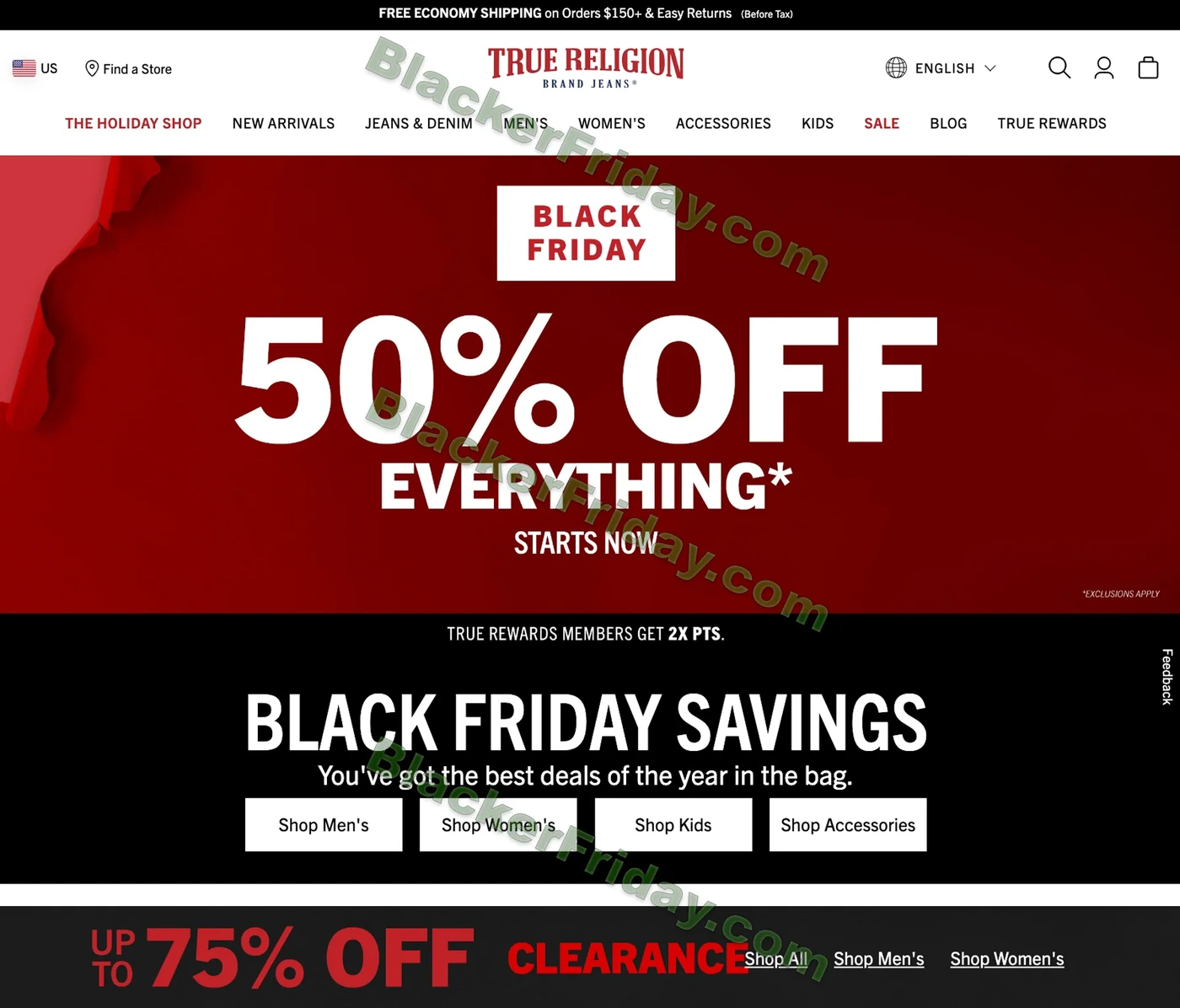
The timing is the detail worth copying. Black Friday brings many new customers at once, and a first tier that one or two orders can reach gives each of them a reason to stay in the program after the sale.
You can reach the same goal in two ways. One is to lower the entry point, for example by adding a new, lower first tier just for the BFCM season. The other is to keep your tiers as they are and speed up the climb, as True Religion did with double points.
Setting it up in Shopify. Shopify has no loyalty tiers, but you can build a simple version with customer segments.
- Create a segment of customers who have spent above your threshold, for example
amount_spent > 65. - Create an automatic discount or a free shipping discount for that segment. Segments update on their own, so a customer who passes $65 on Black Friday joins the segment.
Here, however, you need to take special care to inform your customers about the offer, with banners, email or some other means.
Setting it up with an app.
6. Sell gift cards after your last shipping day
Why it works. In mid-December, most stores reach the last day when an order can still arrive before Christmas, and sales of physical products slow down. A gift card does not need shipping, because Shopify delivers it by email, so you can keep selling right up to December 24 and through the holidays.
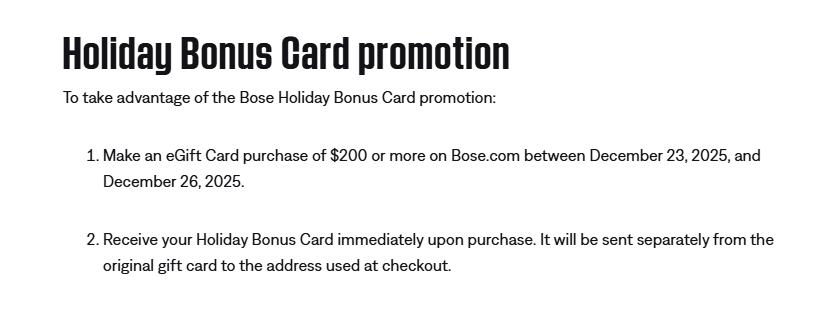
Who does it. Bose sold gift cards right through the holidays in 2025. Between December 23 and December 26, customers who bought at least $200 in eGift cards on Bose.com received a bonus card: “Spend $200 – $299 to get $20, increasing by $10 for each additional $100 spent, up to $50 for purchases of $500 or more.” The bonus card was valid for 30 days, so the buyer had a reason to come back in January too.
Setting it up in Shopify. Everything you need is already in your admin.
- Create a gift card product with a few amounts, for example $10, $25, $50 and $100.

- In the theme editor, turn on the recipient form for the gift card product page. Customers can then send the card to a recipient’s email with a personal message and choose the date it arrives, for example December 25. The form works in Shopify’s Online Store 2.0 themes, such as Dawn and the Horizon themes.
- Before your last shipping day, put the gift card on your homepage and in an announcement bar: “Too late for delivery? Send a gift card by email.”
- If you want to add a bonus card, as Bose did, issue the bonus gift cards to the buyers from the Gift cards page in your admin.
Setting it up with an app. You do not need one. If you expect a lot of gift card orders and want the bonus cards to go out automatically, look for a gift card app in the Shopify App Store.
P.S. Think about the season, not just the weekend
None of these ideas asks you to give up Black Friday discounts. Instead, they help you decide where a discount really pays off, and where a gift, a points bonus or an early start can do the same job for less. Pick two or three that fit your store, and this BFCM can bring you more than a busy weekend: customers who come back in January.
To see how the apps behind ideas 2 to 5 work, visit the Alpha Sale and Alpha Loyalty pages. You can also read the reviews of Alpha Sale and Alpha Loyalty on the Shopify App Store.