
BFCM is short for Black Friday Cyber Monday. In 2026 the weekend runs from Friday 27 November to Monday 30 November, and for a lot of small stores those four days bring in more orders than any other four days of the year.
Almost all of the work happens before the weekend. This Shopify Black Friday checklist covers that work in seven parts, in the order it has to happen: choosing the products, setting the discount, shaping the offer, building it in your admin, getting the store ready, bringing in the traffic, and cleaning up on the Tuesday.
The dates you are working towards
| Date | What it is |
|---|---|
| Thursday 26 November 2026 | Thanksgiving (US) |
| Friday 27 November 2026 | Black Friday |
| Saturday 28 November 2026 | Small Business Saturday (US) |
| Monday 30 November 2026 | Cyber Monday |
Few stores now run a Black Friday sale that lasts only those four days, and the spending data says the same. Adobe counted $137.4 billion of US online spending between 1 November and 1 December 2025, and $44.2 billion of that in Cyber Week itself (Adobe Analytics) — which leaves about two thirds of November’s spending before the sale weekend began. Shopify’s own advice is the same: plan for a longer selling period than the weekend.
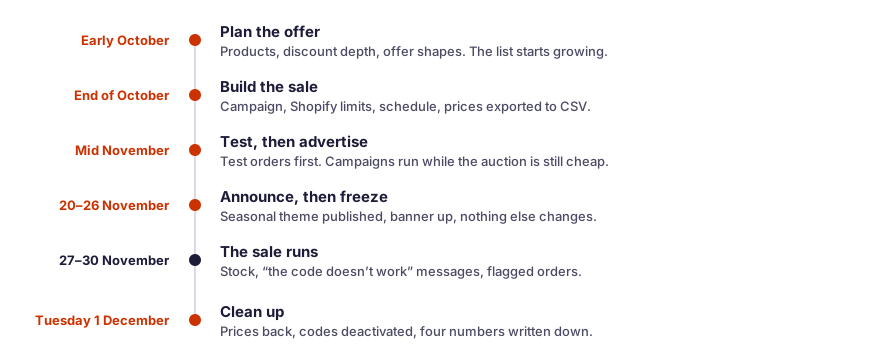
Working back from 27 November, the seven parts of this checklist fall like this.
| When | What happens |
|---|---|
| Early October | The products, the discount and the offers are decided, and the list and the retargeting audience start growing |
| End of October | The sale is built and scheduled, the limits are checked, the prices are exported |
| Mid November | Test orders are placed, the campaigns start running, early access opens |
| 20–26 November | The seasonal theme is published, the announcement goes out, the store is frozen |
| 27–30 November | The sale runs: stock, codes and flagged orders are watched |
| Tuesday 1 December | The prices come back, the codes are deactivated, the numbers are written down |
Part 1. Choose what goes on sale
Most Black Friday planning starts with the discount and then looks for products to attach it to. That order is backwards, because the discount you can afford depends on which products you picked.
Pick products with a high margin, not high sales
A revenue ranking flatters cheap items that move in volume and hides the ones that actually pay your bills. The number you want beside each product in your working list is its gross margin per unit:
Gross margin per unit = price − what the product costs you
A $60 scarf that costs you $36 earns $24. A $12 tote that costs you $8 earns $4, however many you sell. The scarf can carry a discount; the tote cannot.
Margin tells you what a discount would cost you. The next two numbers tell you which products need one.
Check sell-through and weeks of cover
A product can have a healthy margin and still be the wrong thing to discount, because it was going to sell at full price anyway. These two numbers separate the two cases.
Sell-through rate = units sold in the period ÷ units you had at the start × 100
Ninety days is a reasonable window for a small store. A product at 70% sold most of what you bought and will sell the rest on its own. A product at 20% will not. There is no authoritative benchmark for a good number, so compare each product against the rest of your own catalogue.
Weeks of cover = units in stock ÷ average units sold per week
This is how long the stock lasts at the current pace. Compare it with how long your supplier takes to deliver. Fourteen weeks of cover on a product with a four-week lead time means money is sitting still, and that is a better reason to discount than any seasonal instinct.
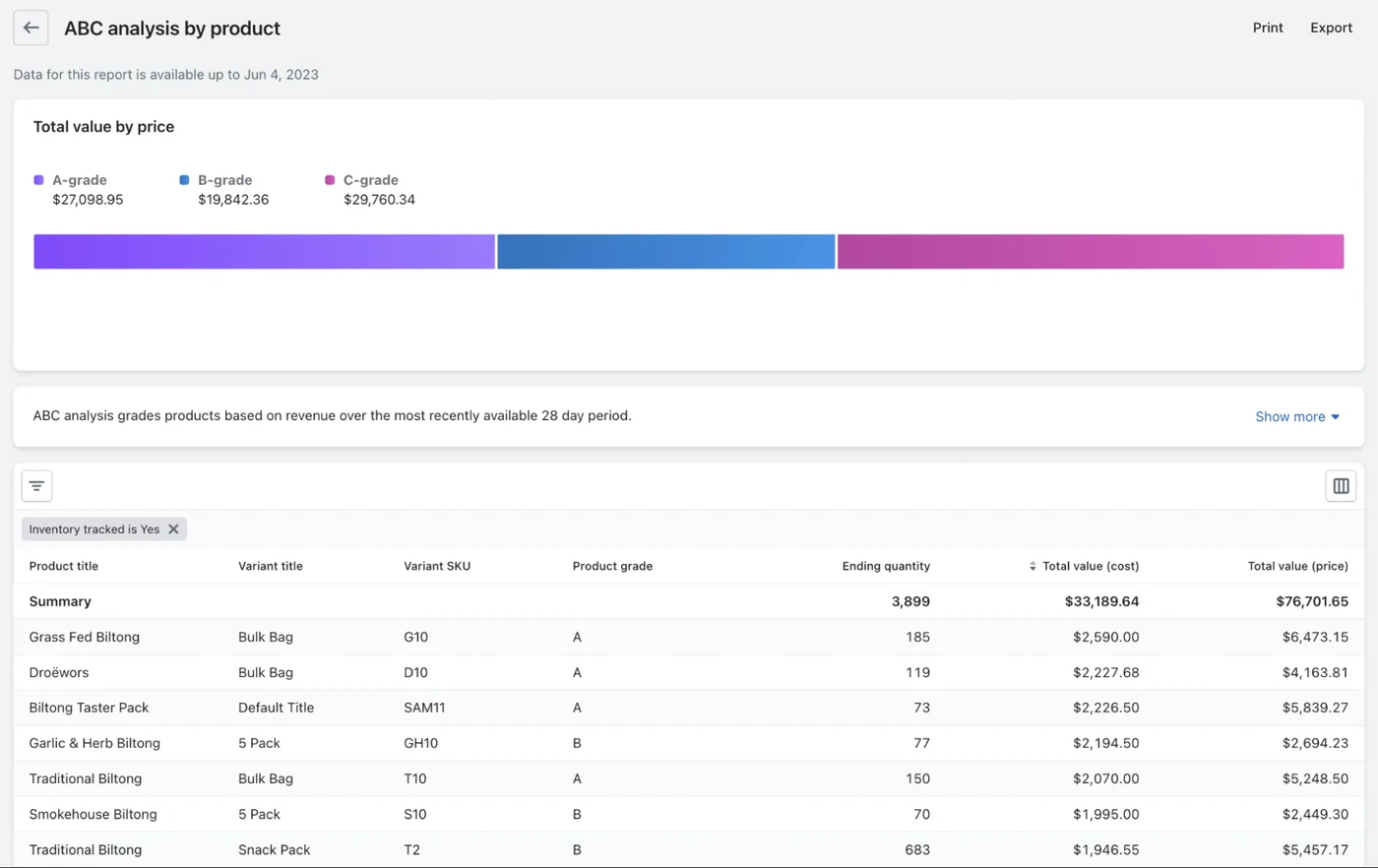
Shopify does one version of this grouping for you. Its ABC analysis report grades every product by the revenue it produces — A is the group that makes up the top 80% of your sales, B the next 15%, C the last 5% — and Shopify’s own recommendation for C-grade products is to discount them and remove them from the catalogue once they sell out.
Split the catalogue into three decisions
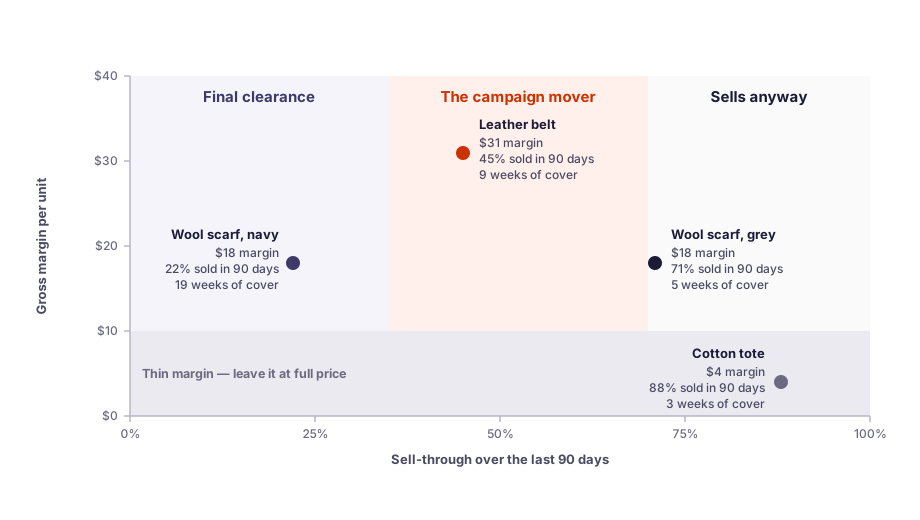
Put the three numbers side by side and every product falls into one of three groups.
| Product | Margin per unit | Sell-through, 90 days | Weeks of cover | Decision |
|---|---|---|---|---|
| Wool scarf, navy | $18 | 22% | 19 | Final clearance — deep cut, then remove it from the catalogue |
| Leather belt | $31 | 45% | 9 | The campaign mover — good margin, room to discount |
| Wool scarf, grey | $18 | 71% | 5 | A small discount; it sells anyway |
| Cotton tote | $4 | 88% | 3 | Leave it at full price |
Give the deepest discount to new customers, not to your regulars
Deep discounts sent to established customers leave them buying less afterwards, while the same offers sent to first-time buyers raise their later purchases. So put the headline discount on the offer aimed at new customers. Your regulars get early access and a smaller cut, which costs you less and works better. The field experiments behind that advice are in our guide to how deep a Black Friday discount should be.
Work out the break-even before you choose a percentage
A discount comes out of your margin rather than out of your price, so the volume it has to bring in is larger than it looks. The formula is extra orders you need = discount ÷ (margin − discount), with both figures as percentages of the selling price. Thirty percent off a product carrying a 40% margin needs three extra orders for every one you were already getting.
Never discount at or below your margin: a 40% cut on a 40% margin sells the product at cost. The full break-even table, last season’s benchmark figures, and the card fees, advertising and returns that sit underneath the table are in our guide to how deep a Black Friday discount should be.
Part 2. Shape the offer
A list of discounted products is not yet an offer. The shape you wrap around the list decides how much of your margin leaves the building.
Move from a sitewide sale to a narrower offer
The list you built in part 1 is already narrower than the whole store, and that is the point. A sitewide percentage is the offer most stores reach for and the one that gives away the most.
- Everything at one percentage. The easiest offer to advertise and the most expensive to run, because it pays a discount on the products that would have sold at full price anyway.
- One category or collection. Cheaper, and it gives the email a subject line: “30% off all knitwear” says more than “30% off”.
- A hand-picked list. The cheapest of the three and the hardest to explain, so it works best when the products have something obvious in common.
Set the spend threshold
A threshold offer — spend $75 and get free shipping, a gift, or $15 off — gives the discount only to customers who added something to reach it. Nobody who was going to spend $40 gets money off. There is no reliable rule for where to put the number. The method testing teams use is to take about 90 days of orders, sort them by value, and find where a lot of orders group within a few dollars of each other, then compare that cluster with the threshold you have now (Intelligems). An average pulled across a long tail of large orders sits nowhere near where your customers actually shop.
Free shipping thresholds move in both directions, and the direction depends on your orders. One store lowered its threshold from $150 to $75, just under the $85 an average product in that store cost, and saw conversion rise 6% and revenue per visitor rise 2%, with the share of orders getting free shipping going from 17.4% to 60% (Intelligems). A sports equipment brand went the other way: more than 85% of its orders already qualified, so it raised the threshold from $100 to $500 against an incoming average order value of $650, and saw average order value rise 6% and revenue per visitor 12% (Intelligems).
Give a gift instead of a deeper discount
A gift costs you what you paid for it, not what it sells for. On a $100 order at a 45% margin, “$20 off” takes twenty points of margin. A gift you buy for $6 takes six, and the customer sees a present rather than a smaller number.
Buy-one-get-one-free is the opposite trade: the customer pays for one unit and you hand over two, which is a 50% discount on the order with the cost doubled. Anything under a 50% margin sells at a loss.
Do not add a countdown timer out of habit
Online promotions with a deadline do not reliably sell better than the same promotions without one — unless the deadline comes from outside the shop, such as a holiday (Journal of Marketing Research, 2023). Black Friday is that kind of deadline, so a timer counting down to the real end of the sale is fine. A timer invented to create urgency on an offer that is open all week is the one to skip.
Part 3. Build the sale in your admin
Decide between a discount and a price change
Shopify gives you two ways to make a price lower, and the difference only shows up at the end of the sale.
A discount — a code, or an automatic discount that applies with no code to type — takes the money off in the cart. Discounts have active dates, so you can build one today, set it to start on 27 November and set it to end on 1 December. It stops on its own.
A price change is the other way. You lower each product’s price and put the old price in the compare-at field, and the storefront shows the crossed-out price that shoppers respond to. That is why most sitewide sales are built this way. But a price is only a price: it has no start date, no end date, and nothing puts it back. Shopify Plus stores have Launchpad, which schedules price changes and theme changes for an event. On every other plan, scheduled price changes are not part of Shopify.
Export your prices before you change anything
The bulk editor can change 400 prices in one pass, and it can change them back the same way. But it cannot tell you what each price was before, because Shopify keeps no record. Export your products to a CSV file from the Products page and keep that file somewhere you will find it on 1 December. That file is your only copy of the old prices.
Check the campaign against Shopify’s limits
Five limits are worth checking now rather than on the Friday morning.
- Twenty-five automatic discounts. A store can have 25 active automatic discounts at a time, and the ones your apps create count towards that number.
- A hundred targets on a code. One discount code can name at most 100 specific customers, products and variants together, and Shopify shows an error past that. Collections are not in that count, so a collection covers a large group of products with one code.
- Codes and automatic discounts do not combine until you allow it. A new discount combines with nothing, and the permission has to be set twice: on this discount, and on the one it should combine with. When they do combine, one order takes up to five product or order codes plus one shipping code.
- A code still applies on top of a reduced price. Shopify does not treat a lowered price as a discount, so a customer who puts a sale item in the cart and enters your Black Friday code gets both. The Combinations section does not stop it.
- One code per discount in the admin. The create screen has a single code field. One discount can hold many codes, but they are added through an app or the API, so a code for every influencer or partner is not an admin job.
On a weekend when most of the catalogue is reduced, that last limit is the one that costs the most, and it stays invisible until you read the orders.
Once the campaign gets more complicated than one percentage on one collection, setting it up in Shopify alone gets harder: the limit on products and variants, no exclusions, no targeting by vendor or tag. That is where a third-party app such as Alpha Sale comes in, because it targets the fields your catalogue already uses and the list you built in the spreadsheet becomes a campaign without building a collection first.
Our complete guide to Shopify discounts goes through the rest of the combination rules, and our guide to creating a discount code in Shopify goes through the create screen field by field.
Part 4. Get the store ready
Check the inventory settings on what you advertise
Shopify has a per-variant setting called Continue selling when out of stock, and a product with that setting on keeps selling after its inventory reaches zero. That makes sense for pre-orders and much less sense on the product at the top of your Black Friday email. The setting does not apply to orders placed through Shopify POS, where staff can still oversell, though the POS app warns them first.
Decide in advance which you would rather do when the hero product runs out: let it oversell and apologise, or let it go out of stock and lose the orders.
Place test orders before the first ad runs
Testing takes fifteen minutes and saves more support messages than anything else on this list.
- Open your store in a private browser window so you are not signed in as yourself, add a product that qualifies, and go through to checkout. Read the amount that comes off, not just the fact that something came off.
- Check the sale price in every place it should appear: the product page, the collection page, the cart and the checkout.
- Build the cart that should fail. If the offer has a minimum, put together a cart below it and check that the code is refused. If the code should not apply to reduced items, put a reduced item in on its own.
- Do all of it on a phone as well. 56% of US online holiday purchases last season were made on one.
Step 2 is the one that catches people out, and the reason is where Shopify draws its line. Lower a price, fill in the compare-at field, and the product page and the collection page show the crossed-out price and the sale badge on their own. The cart and the checkout do not. Showing the original price there is a Shopify Plus feature, unless an app puts it back — and the checkout is exactly where the shopper decides.
Build the seasonal theme on a duplicate
Most of what the storefront needs for a sale comes from the campaign itself — the crossed-out prices, the savings widget, the announcement bar. This step is for anything beyond that: a seasonal banner image, a reordered homepage, a section built for the offer.
Do that work on a duplicate of your theme and publish the copy on the day the sale opens. Editing the theme that is currently published sends every half-finished change straight to your visitors, and Shopify’s own advice is to keep a duplicate to go back to.
The Shopify admin cannot publish a theme at a set time, Launchpad on Plus aside, so somebody has to press the button on the day. Put it in the calendar next to the campaign’s start time.
Freeze the store a week before the sale opens
Pick the day you stop changing the store and treat everything after it as final. Do not install an app you have not tested on a quiet week, and do not rewrite the product pages you are about to send traffic to.
One rule matters more than the rest: do not edit a discount that is already in customers’ hands. The change reaches everyone still holding that code, so somebody gets terms different from the ones you sent. If the offer has to change, make a second code and let the first one expire.
Part 5. Bring in the traffic
Grow the list and the retargeting pool in October
The people who buy from you in November are mostly people who already knew about you in October. Klaviyo found that browsing on store sites starts climbing about ten days before Black Friday, so by the middle of the month the audience you can reach is largely the one you have already collected.
Two things fill that gap, and both take weeks. An early-access page — one line about the sale, one email field — can go up in October and gives every ad you run something to convert into. A retargeting audience only works if somebody is in it, and analysis of brands across the 2024 season found that the earlier a brand started priming its audiences, the bigger the lift in gross profit it saw during BFCM (Rockerbox).
This step collects the people. Spending money against them is the step after next.
Publish the sale page now, even though it will not rank this year
Only 1.74% of newly published pages reach Google’s top ten within a year, and 72.9% of the pages that sit there are more than three years old (Ahrefs). So in search terms a sale page published in November will not bring you anything this season.
Publish it anyway, and keep one permanent URL. If you ran a sale page last year, run this year’s sale on that same page rather than creating a new one — it already has whatever age and links it earned. A page with two seasons behind it has a chance in 2028 that a page built in November 2026 never had.
Start the campaigns in mid-November, before the auction fills up
Advertising in the last week of November costs more and returns less. Across more than 33,000 stores measured by Triple Whale, BFCM 2025 cost $22.26 per thousand impressions on Meta, up almost 8% on the year; on Google the cost per acquisition rose 34% and return on ad spend fell 21%.
The rise is a step rather than a cliff, and the step lands before the weekend. In 2025 advertisers spent about two thirds of the whole sale weekend’s budget in the four days before Thanksgiving, and Tinuiti measured Meta costs running 13% below the previous year in the week before the holiday, then climbing across the weekend itself. The middle of November is the cheap window, and it is when the campaigns should already be running — against the audience you spent October collecting. Retention channels delivered substantially better incremental ROAS during BFCM than prospecting did (Rockerbox), because you are not bidding against every retailer in your category for a cold impression.
Decide whether new or returning customers bring you more
Whether BFCM money comes from new or from returning customers depends on your industry, and the gap is wide. Klaviyo measured food and drink stores taking 70.2% of their BFCM revenue from repeat customers, while sporting goods took 64.7% and home and garden 67.5% from first-time buyers.
Find out which side your category sits on before you write the offer, because the two answers lead to different campaigns.
If returning customers bring more, the money is in the list you already have, so work it properly. Early access two days before the public sale gives your regulars something the public offer does not have, and it costs no margin. That is also what the field experiment in part 1 points to: your established customers do not need the biggest discount in the store, they need to be first.
If new customers bring more, the headline discount belongs on the offer they see, and the audience you built in October matters more than the email schedule does.
Lean on email and SMS while the ads are expensive
Omnisend puts SMS click rates at 20.3% in November against 3.5% in January, while the conversion rate stays where it was all year, at around 0.1%. More people click and the same share of them buy, so the same message sent in November brings several times the orders it would bring in January, at the same cost to send.
That is the trade worth seeing. In the weeks when a click bought at auction costs more than usual, a click from your own list costs what it always did. So the list you spent October growing is the cheapest traffic you will have all season, and the sends are where the weekend is won.
Part 6. Run the weekend
Watch the stock on what you advertised
The product in the email is the one that sells out at four in the morning. Check it in the morning and again in the evening, then follow the out-of-stock rule you set in part 4: either it keeps selling and you apologise to the customers who wait for stock, or it goes out of stock and you lose those orders. Both are survivable. Deciding at four in the morning is not.
Answer the “code doesn’t work” messages from a short list
Almost all of them have three causes, and Shopify’s checkout shows a different message for each one. Ask the customer what they saw.
| What the customer says | Usually means | What you do |
|---|---|---|
| The code is not valid | The cart is below the minimum, or the discount does not cover those products | Tell them what the offer needs — the minimum, or which products it covers |
| The code says it has been used | An unfinished checkout is still holding it | Send a replacement code on the same terms; the hold clears on its own when the payment fails |
| The discount is smaller than expected | The product was already reduced, so the code came off the sale price and not off the original one | Say which price the code applied to; do not add a second code by hand to make up the difference |
Look at the flagged orders before you fulfil them
Shopify’s fraud analysis marks orders that look risky, and a big weekend produces more of them than usual. Ten minutes with the flagged list on the Saturday is cheaper than a chargeback in January.
Part 7. Clean up on the Tuesday
Tuesday 1 December is the other half of the campaign, and the half that gets forgotten.
Put the prices back
If the sale was scheduled, this is already done. If you changed prices by hand, restore them from the CSV file you exported, then open ten products and check them yourself.
Deactivate the codes rather than deleting them
A deactivated discount keeps its history, so your reports still show what the code did. A deleted one leaves the list and takes the answer with it.
Publish your usual theme again
The seasonal theme goes back to a draft, the announcement bar comes down. A store still advertising Black Friday in December reads as abandoned.
Write down the four numbers you will want next year
Units sold and gross profit for each discounted product, so you can see which discounts cleared the bar in part 1. Orders by code, so you know which channel paid — which only works if each channel had its own code. New customers against returning ones. And the return rate once January is over: returns land weeks after the celebration and change the answer, though they are not automatically worse in a discount season — Adobe measured US holiday returns down 1.2% year on year in 2025.
A separate code per channel is what makes the second number answerable at all. Our guide covers how to tell whether a discount paid off.
BFCM checklist FAQ
What does BFCM stand for? Black Friday Cyber Monday — the shopping weekend that starts on the Friday after American Thanksgiving and ends on the Monday. In 2026 that is 27 to 30 November.
When should I start preparing for Black Friday on Shopify? Start your BFCM preparation in early October: choose the products, work out the discount, shape the offers, and begin growing your list. The build happens at the end of October, the tests and the first campaigns in mid November.
How do I choose which products to put on sale? Rank the catalogue by gross margin per unit, then look at sell-through and weeks of cover over the last 90 days. Slow-moving stock with months of cover is the clearance list. Products that sell anyway need only a small cut, and thin-margin products are usually better left alone.
How much should I discount for Black Friday? No deeper than your margin allows at the volume you expect. Use the break-even: with a 40% margin, a 20% discount has to double your orders to stand still, and a 40% discount leaves nothing to sell. Our guide to Black Friday discount depth works through the table and the benchmarks. Start there rather than from the number your competitors are advertising.
When should my Black Friday sale start and end? Earlier and longer than the weekend itself. Many stores open in the week before Black Friday and close at the end of the month. A longer window spreads orders across more days, which is easier on packing and on your carrier.
When should I start advertising my Black Friday sale? Grow the audience from early October and run the campaigns from the middle of November. Advertising costs rise across the sale weekend, so the last week is the most expensive time to meet somebody for the first time.
Can I schedule a sale on Shopify? Discounts, yes: every discount has a start date and an optional end date, and it turns itself on and off. Price changes, no — a lowered price has no dates. Scheduling those needs Launchpad on Shopify Plus, or an app such as Alpha Sale on any plan.
Do I need an app to run a Black Friday sale? Not if your catalogue is small and you are willing to change prices by hand twice. The work grows with the number of products, and the risky half is the Tuesday, when the old prices have to come back exactly as they were.
What happens if I sell out during the sale? The product stops selling, unless Continue selling when out of stock is switched on for that variant. Check that setting on the products you are about to advertise, so overselling is a decision rather than a surprise.
A BFCM checklist looks like a list of jobs for November, and it is really a plan for October. A Black Friday weekend that goes well is dull from the inside. The products were chosen in October against margin and sell-through, the discount was set at a depth the margin could carry, the audience was collected before the advertising got expensive, and the prices are already scheduled to come back. The weekend itself is the part where nothing needs doing.
If the part you are dreading is the pricing — discounting a whole catalogue at once, keeping coupons off items that are already reduced, and putting every price back on the Tuesday — Alpha Sale does those on a schedule. There is a free plan to try it on this year’s campaign, and you can read the reviews on the Shopify App Store.