
Welcome the new Quantity discounts feature in Alpha Sale! Now you can reward customers in your Shopify store for buying more: the more items they add to the cart, the bigger the discount. Alpha Sale shows the tiers in a table on the product page and applies the right discount automatically in the cart. There are no codes for customers to remember and no extra app for you to install.
Quantity discounts are available on the Basic, Pro and Ultimate plans.
Grow the order instead of cutting the price for everyone
A storewide sale cuts your margin on every order, even from customers who would have bought one item at full price anyway. A quantity discount works the other way round: the lower price is only for customers who buy more. Shoppers get a clear reason to add another item or two, and your average order value (AOV) grows without giving away margin on every sale.
Better than quantity discounts in Shopify
If you have ever tried to set up quantity discounts in Shopify, you know it is possible, but not easy. Shopify allows only one tier per discount, so a three-tier offer means three separate discounts. Run a few offers like that, and they become almost impossible to manage.
In Alpha Sale, the whole offer is one campaign, with all the flexible settings you need in a clear interface. And most importantly, customers see the tiers in a table on your product pages.
Set up to 10 tiers in one campaign
Each tier has a minimum quantity and a discount. Once a customer reaches a tier, the discount applies to every item. Here is how three tiers work for a $30 T-shirt:
| Items in the cart | Discount | Price per item | Total |
|---|---|---|---|
| 1 | — | $30.00 | $30.00 |
| 2 | 10% off | $27.00 | $54.00 |
| 3–4 | 15% off | $25.50 | $76.50 for 3, $102.00 for 4 |
| 5 or more | 20% off | $24.00 | $120.00 for 5 |
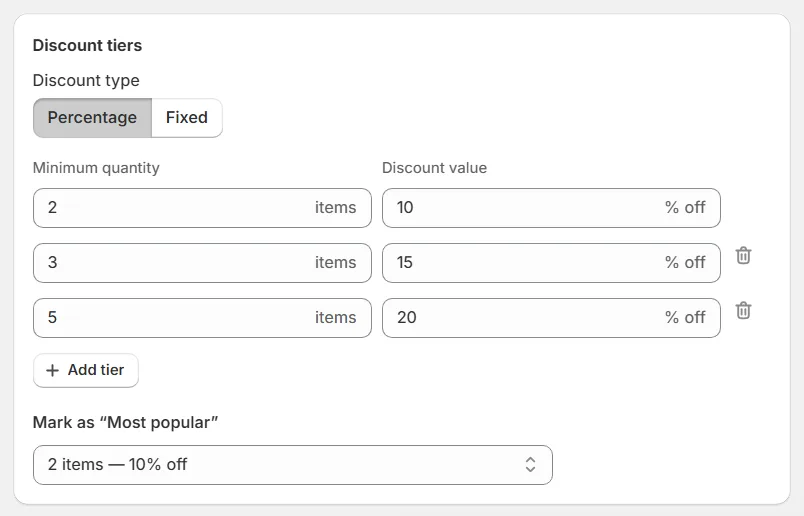
The discount can be a percentage or a fixed amount off each item, and it is applied in the cart and at checkout as a regular Shopify automatic discount.
Decide which items count toward a tier
“Buy 3” means different things in different stores. A sock shop is happy when customers mix and match three designs, while a paint shop wants five cans of the same colour before the price drops. That is why Alpha Sale offers three ways to count items:
- Any mix of products: every item in the campaign counts toward the tier, so three pairs of different socks qualify.
- Same product, any variant: each product is counted separately, with all its sizes and colours combined. Two T-shirts in size S and one in size M qualify, but a mug in the same cart does not count.
- Same variant only: only identical items add up. Five cans of the same colour reach the 5-item tier, while four cans of one colour and one of another do not.
You choose which products get the discount by product, collection, vendor or tag, and you can exclude products the same way. You can also limit the offer to specific markets, individual customers or customer tags.
Show the tiers on the product page
The quantity discount table shows the price per item and the savings at every tier, right where customers decide how many to buy. Add it with the Alpha Sale: Quantity discount table block in the Shopify Theme Editor and place it wherever it fits your product page — above the Add to cart button, for example. The design and texts are set once for all campaigns in Widgets → Quantity discount table.
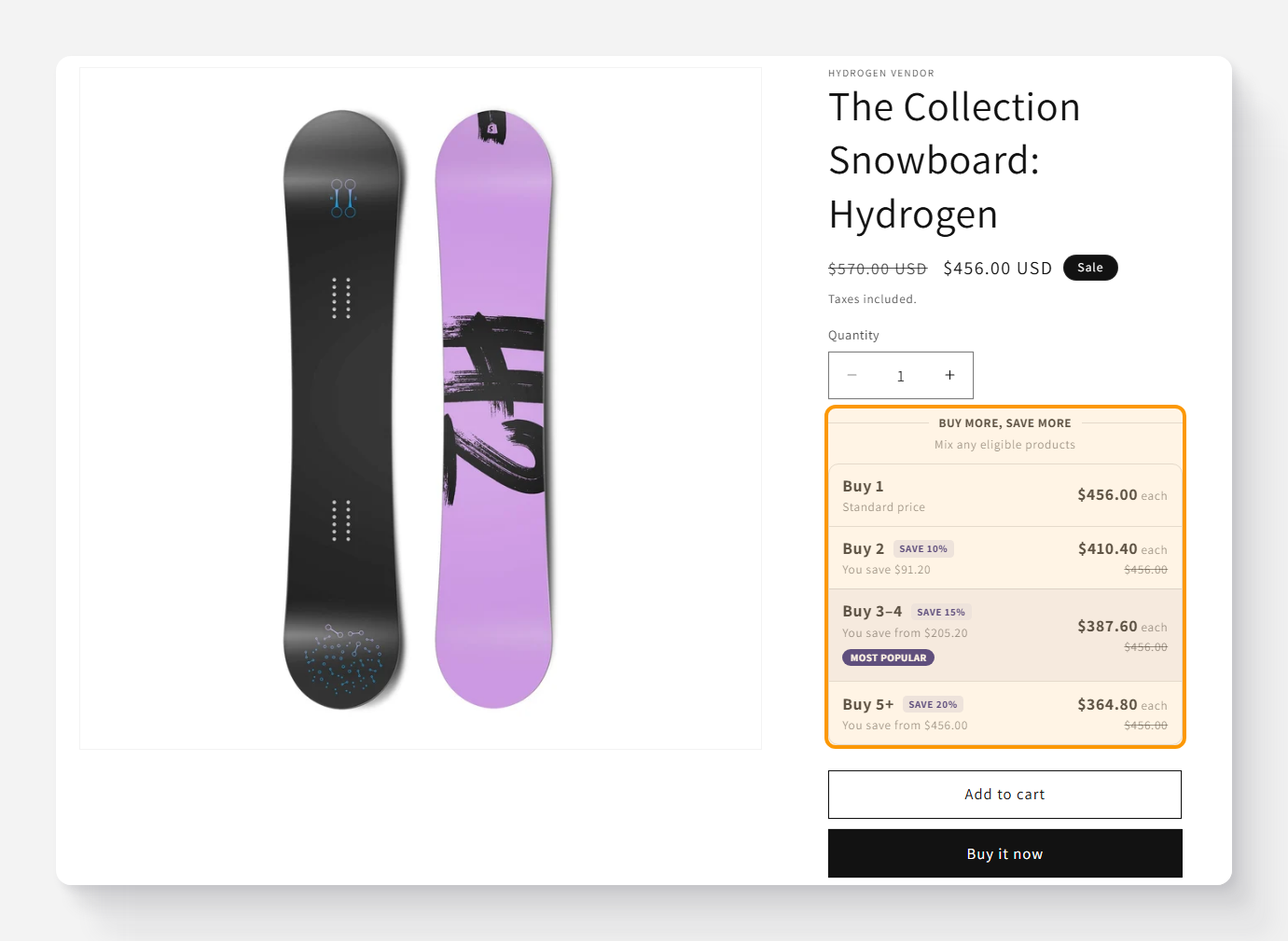
Because the table and the cart use the same calculation, the price on the product page always matches the price in the cart.
The table appears only for customers who can get the discount. If the offer is limited to customers with a “VIP” tag, guests see the regular product page.
For a step-by-step setup, see Quantity discount settings and targeting in our help center. If you’d rather hand the setup to someone, find an Alpha Sale expert on ShopExperts.
Quantity discounts FAQ
Is a quantity discount the same as a volume discount or tiered pricing? Yes. Quantity discounts, volume discounts, quantity breaks and tiered pricing are all names for the same offer: the more a customer buys, the less each item costs. In Alpha Sale, tiers are based on the number of items.
Can a customer use a discount code on top of a quantity discount? It depends on how both discounts are set to combine. If an order discount code and the quantity discount are both allowed to combine, the quantity discount applies first and the code is applied to the reduced total. If another product discount applies to the same item, the customer gets the larger one. Our guide to Shopify discounts explains how combinations work.
Which Alpha Sale plans include quantity discounts? Quantity discounts come with the Basic, Pro and Ultimate plans. They are not part of the Free plan.
A quantity discount turns “I’ll take one” into “I’ll take three” without lowering prices for everyone else — and with Alpha Sale, that offer now sits right on the product page. To try it, open Alpha Sale, go to Campaigns → Create campaign and choose Quantity discount.
To see what else the app can do, visit the Alpha Sale page. You can also read the reviews on the Shopify App Store.