
Welcome the new Referral program in Alpha Loyalty! Now your customers can invite friends to your Shopify store: the friend gets a discount on their first order, and the customer earns points or a coupon once that order is paid. The referral program sits in the same Loyalty Widget as your points and VIP tiers, so there is no extra app to install.
Alpha Loyalty is free, and the referral program comes free with it.
Turn happy customers into a sales channel
With ads, you pay for every click, whether the visitor buys or not. A referral works the other way round: a customer who already likes your store recommends it to a friend, and you pay the reward only when that friend places and pays their first order. The friend’s discount is for new customers only, so your regular buyers keep paying full price.
Run referrals in the same app as points and VIP tiers
When loyalty and referrals live in two apps, you get two widgets on the storefront, two customer lists and two places to check when something goes wrong.
In Alpha Loyalty, the referral program is the third program type, next to points and VIP tiers. Customers find their referral link in the same Loyalty Widget where they check their points, and points earned for referrals go to the same balance they spend on your rewards. In the admin, one customer list covers all three programs: if you exclude a customer, their points, VIP perks and referral link stop together.
You can run up to five referral programs and assign them by customer tags, for example to give retail and wholesale customers different rewards.
Give the friend a discount and the customer — points or a coupon
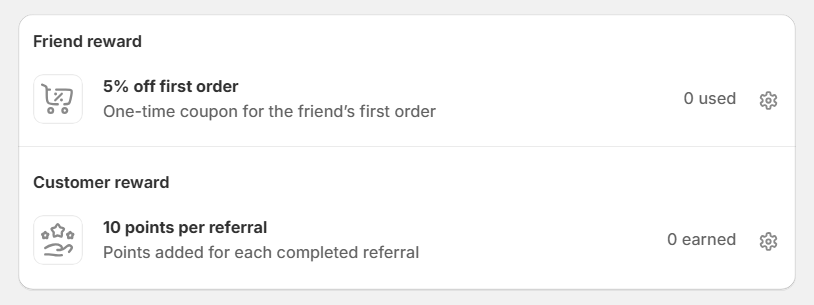
Each program has two rewards. The Friend reward is a one-time discount on the friend’s first order: an order discount, a product discount or free shipping. The Customer reward is either points or a coupon, and the customer earns it for every friend whose first order is paid.
Here is how it works with 10% off for friends and a $10 coupon for customers:
| What happens | Result |
|---|---|
| Olga opens Anna’s link and orders $60 worth of products | Olga pays $54, and Anna gets a $10 coupon once the order is paid |
| Two more friends place and pay their first orders | Anna’s coupon now has 3 uses, $30 in total |
| Anna applies all three uses to a $45 order | Anna pays $15 |
Coupon uses add up, so customers who invite more friends get more uses. They can apply several uses to one order, if you allow it, or spend them one by one on later orders. If you choose points instead, each referral adds points to the customer’s balance, and the Refer friends line in your ways to earn shows customers how many points they get for each friend.
Let customers share a link, a code or both
Referrals can happen in two ways, and you choose whether to use one of them or both.
- A referral link opens your store with a personal special offer for the friend. The offer shows as a bubble next to the widget button. The friend is prompted to claim the discount by entering their email address, and the discount is then applied to their first order automatically.
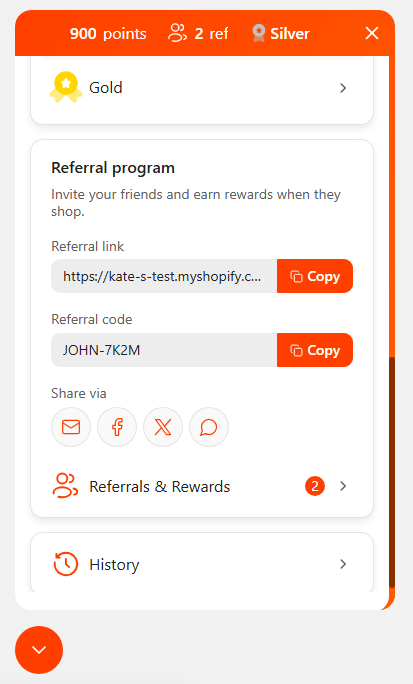
- A permanent code, like
JOHN-7K2M, is easy to say out loud or send in a message. The friend enters it at checkout, or gives it to your staff in store.
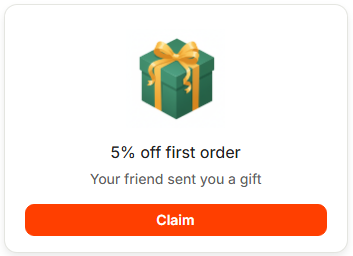
With a referral link, the friend never has to find, copy or type a discount code. The discount is already in the cart when they reach checkout. The widget also has quick share buttons, so customers can instantly send their link or code by email or post it on social media.
Effective fraud protection
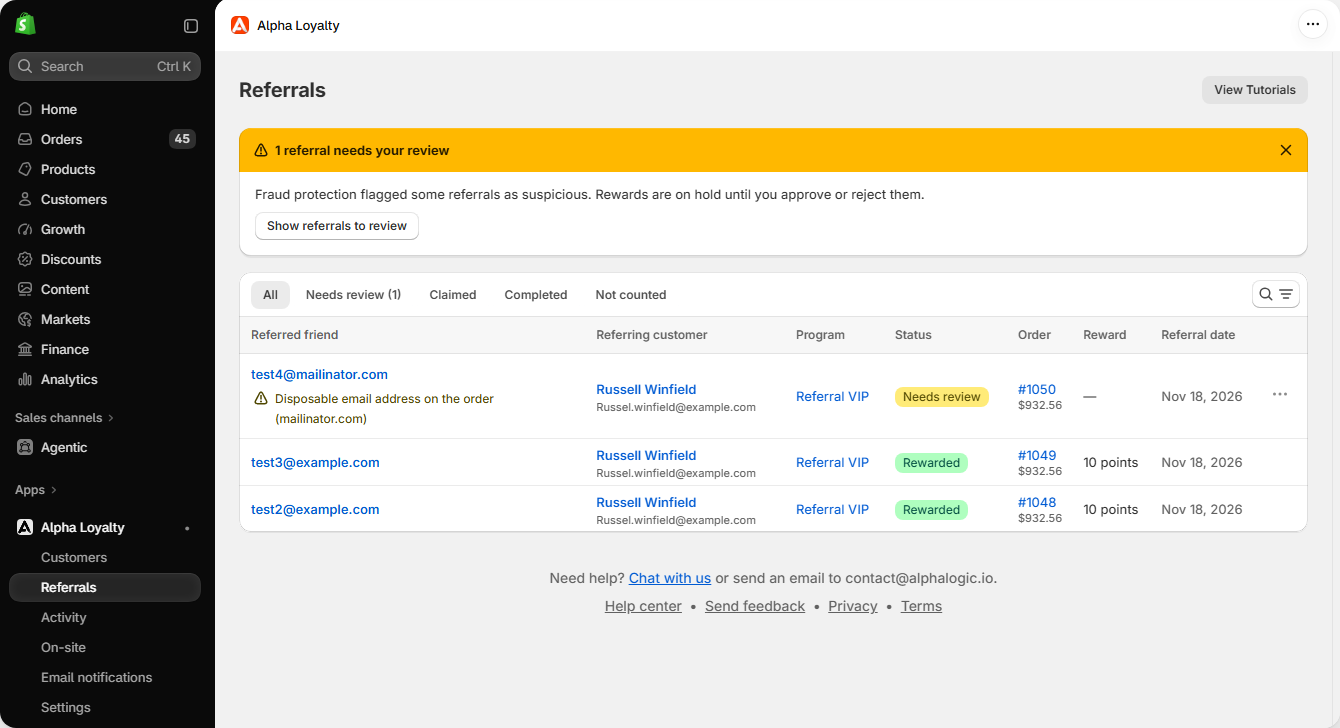
Unfortunately, a referral program often becomes one of the most fraud-prone parts of a store: customers may try to get around the rules to get a discount. In Alpha Loyalty, we have thought through how to keep the program safe. Customers can’t refer themselves, people who have already ordered from you don’t get the first-order discount, and suspicious referrals wait for your review before the customer gets a reward. You choose how strict these checks are.
See every referral in one list
The new Referrals page in the main menu lists every referral from all your programs: who invited whom, the friend’s order, the status and the reward. The Needs review tab collects referrals that fraud protection flagged, and you approve or reject them there. Each program also shows its own results: link clicks, claims, completed referrals, conversion and the revenue from friends’ first orders.
Referrals work in your physical store as well. In Shopify POS, staff see the customer’s referral code and can apply their referral coupon on the Referral rewards tab. To email customers about their referrals, Alpha Loyalty sends four events to Shopify Flow, so you can send the emails through Shopify Messaging, Klaviyo, Omnisend or another email app.
For a step-by-step setup, see the Referral program quick start guide in our help center.
Referral program FAQ
Is a referral program the same as a refer-a-friend or ambassador program? Yes. Referral program, refer-a-friend program and ambassador program are names for the same offer: a customer invites a friend, the friend gets a discount, and the customer gets a reward. In Alpha Loyalty, the customer who invites is the referring customer, and the friend is the referred friend.
Can the friend use the referral discount together with other discounts? You decide in the Combinations setting of the Friend reward. By default, the friend’s discount doesn’t combine with other order discounts, so it doesn’t add up with your own welcome offer.
How much does the referral program cost? Nothing. Alpha Loyalty is free, with all its programs: points, VIP tiers and referrals.
Your happy customers already tell their friends about your store. With Alpha Loyalty, each recommendation now comes with a gift for the friend and a thank-you for the customer. To start, open Alpha Loyalty, go to Loyalty programs and click Add referral program in the Referral programs section.
Install Alpha Loyalty and start turning happy customers into new orders. To see everything the app can do, visit the Alpha Loyalty page.